

Overview:
Straightness — GD&T
1. What is Straightness?
Straightness is a form tolerance that controls how straight a feature must be.
- Controls the straightness of a line or surface
- Does not require a datum
- Controls individual elements of a feature
- Helps prevent unwanted bending or bowing
2. Straightness Symbol
Symbol: ─
- The straightness symbol is a single straight line
- It is specified in a Feature Control Frame (FCF)
- Tolerance is usually given as a linear value
3. Straightness of a Surface
For a surface, straightness controls each individual line element.
Example:Straightness | 0.05 mm
Each line element of the surface must lie within the specified tolerance zone.
4. Straightness of an Axis
For a cylindrical feature, straightness can control the axis.
Example:Straightness | ⌀0.05 mm
The derived axis must remain within a cylindrical tolerance zone of Ø0.05 mm.
Summary:
- Type: Form tolerance
- Datum required: No
- Controls: Line elements / Axis
- Symbol: ─
- Main purpose: Control how straight a feature is
In this article:
- Straightness — GD&T
- 1. Straightness in GD&T
- 2. Straightness Symbol
- 3. What Does Straightness Control?
- 4. Types of Straightness
- 5. Straightness of a Surface
- 6. Straightness Applied to an Axis
- 8. Example — Shaft Straightness
- 9. Straightness vs Flatness
- 10. Straightness vs Circularity
- 11. Straightness vs Cylindricity
- 12. Inspection of Straightness
- 13. Common Mistakes
- 14. Straightness — Interview Questions
- Summary:
1. Straightness in GD&T
Straightness is one of the four form tolerances in GD&T.
The other form tolerances are:
- Flatness
- Circularity (Roundness)
- Cylindricity
Straightness controls how much a line element or axis can deviate from a theoretically perfect straight line.
The key point is:
Straightness controls the straightness of a feature. It does not control its location or orientation unless applied in a specific feature-of-size context.
2. Straightness Symbol
The GD&T symbol for straightness is:
⏤
It looks like a simple horizontal straight line.
A typical Feature Control Frame may look like:
| ⏤ | 0.05 |
This means the controlled feature must satisfy a straightness tolerance of 0.05 mm.
3. What Does Straightness Control?
Straightness controls the amount by which an actual feature can deviate from a theoretically perfect straight line.
The actual feature cannot deviate beyond the specified straightness tolerance zone.
4. Types of Straightness
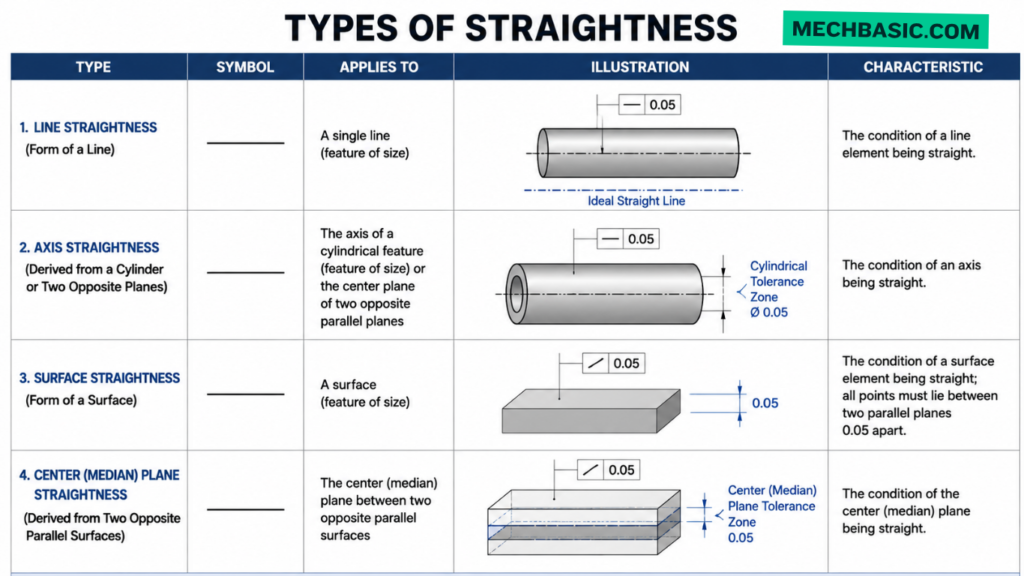
Straightness has two important applications:
Type 1 — Surface/line-element straightness
Controls the straightness of individual line elements on a surface.
Type 2 — Axis straightness
Controls the straightness of the derived median line/axis of a cylindrical feature of size.
These two applications are important because their tolerance zones are different.
5. Straightness of a Surface
When straightness is applied to a surface or line element, it controls each applicable line element independently.
For example:
| ⏤ | 0.05 |
may be applied to a surface.
The tolerance zone consists of two parallel lines separated by 0.05 mm for a line element in the specified direction.
The actual line element must remain between these two boundaries.
When straightness is applied to a surface, it controls:
Individual line elements of that surface.
It does not necessarily mean that the entire surface is flat.
This distinction is very important.
Example
A surface can have every individual line element within its straightness requirement while the overall surface still has variation in another direction.
Therefore:
Straightness ≠ Flatness
6. Straightness Applied to an Axis
Straightness can also control the axis of a cylindrical feature, such as:
- Shaft
- Hole
- Pin
- Cylindrical bore
For an axis, the tolerance zone is generally cylindrical.
Example:
| ⏤ | ⌀0.05 |
The diameter symbol ⌀ indicates a cylindrical tolerance zone.
The derived axis must remain inside a cylinder having:
Diameter = 0.05 mm
8. Example — Shaft Straightness
Suppose a shaft has:
Ø20.00 ± 0.05 mm
and its axis has:
Straightness | ⌀0.04 |
The shaft’s derived axis must remain within a cylindrical zone of:
Ø0.04 mm
along the applicable length of the shaft.
9. Straightness vs Flatness
This is one of the most common GD&T interview questions.
| Straightness | Flatness |
|---|---|
| Controls straightness | Controls flatness |
| Can apply to a line element or axis | Applies to a surface |
| Line element → two parallel lines | Two parallel planes |
| Axis → cylindrical tolerance zone | No cylindrical zone |
| Does not require datum | Does not require datum |
| Can control shaft axis | Controls entire surface |
Straightness = line
Flatness = surface
10. Straightness vs Circularity
Another common question:
| Straightness | Circularity |
|---|---|
| Controls straightness | Controls roundness |
| Controls a line/axis | Controls circular cross-section |
| Line/axis concept | Circular profile concept |
| Can control shaft axis | Controls each circular section |
| Tolerance zone can be two parallel lines or cylinder | Two concentric circles |
Straightness → Is it straight?
Circularity → Is it round?
11. Straightness vs Cylindricity
| Straightness | Cylindricity |
|---|---|
| Controls a line element or axis | Controls entire cylindrical surface |
| Narrower requirement | More comprehensive |
| Can control an axis | Controls cylindrical form |
| Does not by itself control roundness | Controls complete cylindrical form |
| Usually simpler to inspect | More demanding |
A cylindrical component can have a straight axis but still have poor cylindrical surface form.
12. Inspection of Straightness
Straightness can be inspected using different methods depending on the feature and required accuracy.
Common equipment includes:
- Surface plate
- Dial indicator
- Height gauge
- V-blocks
- Precision straightedge
- CMM
- Optical measuring systems
- Roundness/form measuring machines
Simple Shaft Inspection Method
For a shaft, one possible inspection setup is:
- Place the shaft appropriately on suitable supports.
- Rotate or translate it as required by the inspection method.
- Measure the deviation using a dial indicator.
- Compare the measured variation with the specified requirement.
- Ensure the measurement method matches the applicable GD&T standard and feature definition.
For precision inspection, a CMM or dedicated form-measuring machine may be used.
13. Common Mistakes
Mistake 1: Thinking straightness needs a datum
Incorrect.
Straightness is a form control and normally does not require a datum.
Mistake 2: Confusing straightness with flatness
Incorrect.
Straightness controls a line/axis; flatness controls a surface.
Mistake 3: Assuming straightness controls location
Straightness by itself does not establish the feature’s location.
A shaft can be perfectly straight but located away from its nominal position.
Mistake 4: Ignoring the diameter symbol
0.05 and ⌀0.05 indicate different tolerance-zone forms.
Always check whether the diameter symbol is present.
Mistake 5: Assuming shaft size tolerance automatically controls shaft straightness
Size tolerance controls size. It does not automatically impose the same requirement on geometric form.
14. Straightness — Interview Questions
Q1. What is straightness in GD&T?
Straightness is a form tolerance that controls the deviation of a line element or axis from perfect straightness.
Q2. What is the symbol for straightness?
⏤
Q3. Does straightness require a datum?
No.
Q4. What is the tolerance zone for surface straightness?
Two parallel lines for a line element, separated by the specified tolerance.
Q5. What is the tolerance zone for axis straightness?
A cylindrical tolerance zone when the straightness requirement is specified with the diameter symbol.
Q6. Is straightness a form tolerance?
Yes.
Q7. Can straightness be applied to a shaft?
Yes. It can control either applicable surface line elements or the derived axis, depending on how it is specified.
Q8. Can straightness control the location of a shaft?
No, not by itself.
Q9. What is the difference between straightness and flatness?
Straightness controls a line/axis, while flatness controls a surface.
Q10. Can straightness have MMC?
Yes, when applied to an applicable feature of size, subject to the governing GD&T standard.
Summary:
Straightness
- Category: Form
- Symbol: ⏤
- Datum required: No
- Basic purpose: Controls straightness
- Surface/line element zone: Two parallel lines
- Axis zone: Cylindrical when ⌀ is specified
- Controls location: No
- Controls orientation: Not by itself
- Can be applied to: Surfaces/line elements and applicable features of size
- MMC: Can be used in applicable feature-of-size applications
Straightness is a GD&T form control that limits how much a line element or derived axis may deviate from a theoretically perfect straight line.
Latest articles:

Best Budget Workstation Laptops for SolidWorks and Heavy 3D Assembly Modeling
Best Budget Workstation Laptops for SolidWorks and Heavy 3D Assembly Modeling Overview What Does SOLIDWORKS…

SolidWorks Standard vs Professional vs Premium: Full Feature Comparison
SolidWorks Standard vs Professional vs Premium: Full Feature Comparison Overview: SOLIDWORKS Package Overview SOLIDWORKS comes…

SolidWorks 2026 License Cost: Perpetual vs Subscription Pricing Breakdown
SolidWorks 2026 License Cost: Perpetual vs Subscription Pricing Breakdown Overview: SOLIDWORKS 2026 License Options SOLIDWORKS…

Flatness-GD&T | GD&T Tutorials

ANSI vs ISO Standards-Key Differences you need to know
Straightness-GD&T | GD&T Tutorials
Related Tags:
Categories:




















