
Key Takeaways:
AutoCAD vs. Autodesk Inventor
What is Autodesk Inventor?
Autodesk Inventor is a 3D mechanical CAD software used to design machine parts, assemblies, and manufacturing products. It is more focused on 3D mechanical engineering than AutoCAD.
| Feature | AutoCAD | Inventor |
|---|---|---|
| Main Focus | 2D drafting & general CAD | 3D mechanical design |
| 2D Drawing | ⭐⭐⭐⭐⭐ | ⭐⭐⭐⭐ |
| 3D Modeling | ⭐⭐⭐ | ⭐⭐⭐⭐⭐ |
| Part Design | ⭐⭐⭐ | ⭐⭐⭐⭐⭐ |
| Assembly Design | ⭐⭐ | ⭐⭐⭐⭐⭐ |
| Sheet Metal | ⭐⭐⭐ | ⭐⭐⭐⭐⭐ |
| Parametric Design | ⭐⭐⭐ | ⭐⭐⭐⭐⭐ |
| Simulation | Limited | ✅ Advanced |
| Manufacturing | Basic | ⭐⭐⭐⭐⭐ |
| Learning Curve | Easier | Moderate |
AutoCAD is Best For
- 2D technical drawings
- Architectural plans
- Civil layouts
- Electrical drawings
- General drafting
- Construction documentation
Inventor is Best For
- Machine design
- Mechanical components
- Manufacturing
- Automotive products
- Assemblies
- Parametric 3D modeling
- Sheet-metal products
In this article:
- AutoCAD vs Autodesk Inventor
- What is AutoCAD?
- What is Autodesk Inventor?
- AutoCAD is Best For
- Inventor is Best For
- AutoCAD vs Inventor: Key Differences
- AutoCAD vs Inventor: 2D Design
- AutoCAD vs Inventor: 3D Modeling
- AutoCAD vs Inventor: Mechanical Engineering
- AutoCAD vs Inventor: Architecture
- AutoCAD vs Inventor: Manufacturing
- AutoCAD vs Inventor: Learning Difficulty
- AutoCAD and Inventor Career Opportunities
- AutoCAD vs Inventor: Advantages
- AutoCAD vs Inventor: Limitations
- AutoCAD vs Autodesk Inventor: Which is Better?
- Which is Better for Mechanical Engineers?
- Summary Table
- Frequently Asked Questions (FAQs)
- Conclusion
AutoCAD vs Autodesk Inventor
AutoCAD vs Autodesk Inventor is a common comparison for students, engineers, designers, architects, and manufacturing professionals who want to choose the right CAD (Computer-Aided Design) software for their work.
Both AutoCAD and Autodesk Inventor are developed by Autodesk, but they are designed for different engineering and design requirements.
AutoCAD is a versatile CAD platform primarily used for creating 2D drawings, technical documentation, layouts, and basic 3D models. It is widely used in architecture, civil engineering, mechanical engineering, electrical design, and many other industries.
Autodesk Inventor, on the other hand, is a specialized 3D mechanical design and engineering software designed for creating parts, assemblies, machines, and manufacturing-ready engineering documentation. Inventor provides parametric modeling, assembly design, sheet metal tools, simulation capabilities, and advanced mechanical engineering workflows.
What is AutoCAD?
AutoCAD is a computer-aided design software developed by Autodesk for creating precise 2D drawings and 3D models.
It is one of the most widely used CAD platforms and is used by engineers, architects, designers, drafts people, and construction professionals.
AutoCAD allows users to create:
- 2D technical drawings
- Floor plans
- Mechanical drawings
- Electrical layouts
- Architectural plans
- Construction documentation
- Schematics
- 3D models
- Manufacturing drawings
AutoCAD provides tools for creating accurate geometric objects such as:
- Lines
- Circles
- Arcs
- Polylines
- Dimensions
- Hatches
- Blocks
- Text
- Solids
- Surfaces
Because of its flexibility, AutoCAD is suitable for many different industries.
What is Autodesk Inventor?
Autodesk Inventor is a professional 3D mechanical design and engineering software used to develop products, components, machines, and mechanical systems.
Unlike traditional 2D CAD workflows, Inventor uses parametric 3D modeling, allowing engineers to create intelligent models whose dimensions and relationships can be modified easily.
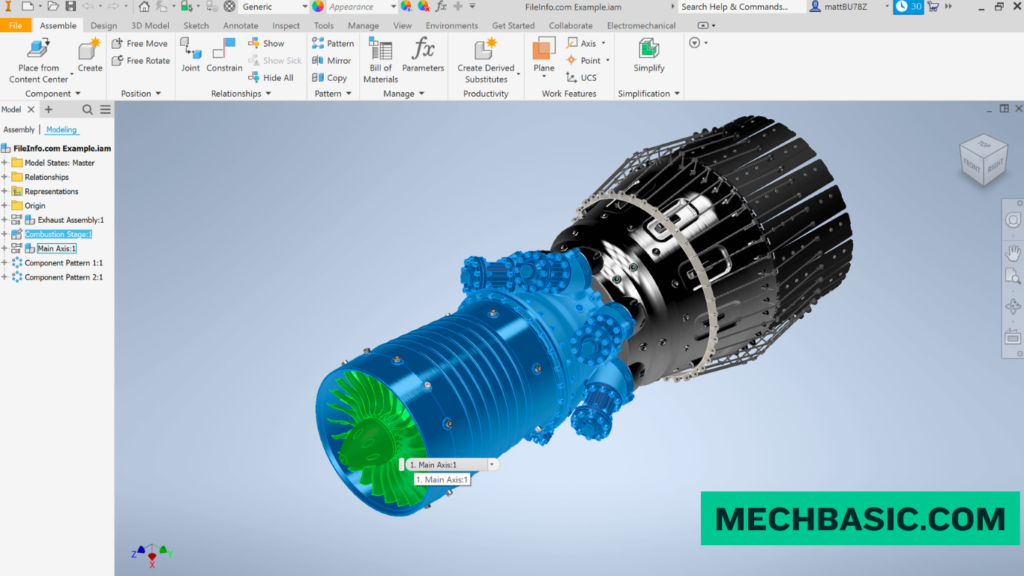
Inventor is commonly used for:
- Mechanical part design
- Assembly design
- Sheet metal design
- Machine design
- Product development
- Weldments
- Engineering drawings
- Design automation
- Manufacturing documentation
- Mechanical simulation
Inventor supports a complete mechanical design workflow from individual components to complex assemblies and detailed manufacturing drawings.
Autodesk Inventor: 3D modelling software for designers and engineers
AutoCAD is Best For
AutoCAD is particularly suitable for professionals who primarily work with 2D drafting, technical documentation, layouts, and general-purpose CAD design.
1. 2D Technical Drawings
AutoCAD is widely used for producing precise 2D engineering drawings.
Examples include:
- Mechanical drawings
- Architectural drawings
- Electrical layouts
- Construction drawings
- Fabrication drawings
- Site plans
2. Architectural Design
Architects and designers use AutoCAD to create:
- Floor plans
- Elevation drawings
- Section drawings
- Site layouts
- Construction documentation
- Interior layouts
AutoCAD is particularly useful when accurate 2D documentation is the primary requirement.
3. Civil Engineering
AutoCAD can be used for:
- Site layouts
- Road drawings
- Utility layouts
- Structural drawings
- Survey drawings
- Construction plans
Specialized Autodesk products such as Civil 3D can extend AutoCAD-based workflows for civil engineering applications.
4. Electrical Design
AutoCAD can support electrical drafting and documentation.
Applications include:
- Electrical layouts
- Wiring diagrams
- Control panel drawings
- Circuit documentation
- Electrical schematics
For specialized electrical workflows, Autodesk also provides AutoCAD Electrical.
5. Mechanical Drafting
AutoCAD is useful for creating:
- Machine drawings
- Component drawings
- Manufacturing drawings
- Assembly layouts
- Fabrication drawings
However, for complex parametric mechanical assemblies, Inventor generally provides more specialized tools.
6. General CAD Design
AutoCAD is a good choice when users need a flexible CAD platform that can handle different types of drawings and documentation.
Inventor is Best For
Autodesk Inventor is primarily designed for 3D mechanical engineering and product development.
1. 3D Mechanical Design
Inventor allows engineers to create detailed 3D components using parametric modeling.
Examples include:
- Shafts
- Brackets
- Gears
- Housings
- Frames
- Machine components
- Mechanical mechanisms
2. Assembly Design
One of Inventor’s major strengths is its assembly environment.
Engineers can combine multiple components into complete mechanical assemblies.
Examples include:
- Pumps
- Gearboxes
- Motors
- Conveyor systems
- Machines
- Automotive components
- Industrial equipment
3. Parametric Modeling
Inventor uses parametric design principles.
This means dimensions and design relationships can be controlled using parameters.
For example:
Length = 100 mm
If the length is changed to:
Length = 150 mm
the associated geometry can automatically update according to the defined design relationships.
This makes Inventor highly useful for engineering design changes and product development.
4. Sheet Metal Design
Inventor provides specialized tools for designing sheet metal components.
Applications include:
- Enclosures
- Brackets
- Cabinets
- Panels
- Covers
- Sheet metal frames
Engineers can develop flat patterns and manufacturing documentation from sheet metal models.
5. Machine Design
Inventor is particularly useful for designing complete machines and mechanical systems.
Applications include:
- Industrial machinery
- Automation equipment
- Material-handling systems
- Manufacturing machines
- Mechanical assemblies
6. Engineering Drawings
Inventor can automatically generate detailed 2D drawings from 3D models.
These drawings can include:
- Dimensions
- Section views
- Detail views
- Assembly views
- Parts lists
- Balloons
- Bill of materials (BOM)
This creates a connection between the 3D design and manufacturing documentation.
7. Design Automation
Inventor supports engineering workflows where repeated design tasks can be automated.
This can help engineers create variations of products and components more efficiently.
AutoCAD vs Inventor: Key Differences
| Feature | AutoCAD | Autodesk Inventor |
|---|---|---|
| Primary Purpose | General CAD and drafting | Mechanical 3D design |
| 2D Drafting | Excellent | Very Good |
| 3D Modeling | Available | Advanced |
| Parametric Modeling | Limited compared with Inventor | Excellent |
| Mechanical Assemblies | Basic to moderate | Advanced |
| Sheet Metal | Available depending on workflow | Advanced |
| Machine Design | Good for drawings | Excellent |
| Product Design | Good | Excellent |
| Engineering Drawings | Excellent | Excellent |
| Architectural Drafting | Excellent | Not the primary focus |
| Civil Drafting | Excellent | Not the primary focus |
| Mechanical Engineering | Good | Excellent |
| Assembly Management | Limited compared with Inventor | Advanced |
| Manufacturing Design | Good | Excellent |
| Learning Difficulty | Generally easier to start | More advanced |
| Best For | 2D drafting and general CAD | 3D mechanical engineering |
AutoCAD vs Inventor: 2D Design
Winner: AutoCAD
When it comes to 2D drafting, AutoCAD is generally the stronger choice.
AutoCAD provides a comprehensive set of tools for creating precise 2D drawings.
It is commonly used for:
- Floor plans
- Mechanical drawings
- Electrical drawings
- Construction drawings
- Technical documentation
- Layouts
Inventor can also generate 2D engineering drawings, but its primary strength is creating those drawings from 3D parametric models.
For dedicated 2D drafting, AutoCAD is usually the better choice.
AutoCAD vs Inventor: 3D Modeling
Winner: Inventor
Both applications support 3D modeling, but their approaches are different.
AutoCAD provides general-purpose 3D modeling capabilities.
Inventor is specifically designed for engineering-oriented 3D modeling.
Inventor provides:
- Parametric parts
- Assemblies
- Constraints
- Mechanical relationships
- Sheet metal tools
- Design automation
- Manufacturing documentation
For mechanical 3D modeling, Inventor is generally the better choice.
AutoCAD vs Inventor: Mechanical Engineering
For mechanical engineers, Inventor provides a more specialized environment.
Inventor supports:
- Part modeling
- Assembly modeling
- Sheet metal
- Weldments
- Mechanical components
- Product design
- Engineering drawings
- Bill of materials
- Design automation
AutoCAD remains valuable for mechanical drafting, but Inventor provides a more complete 3D mechanical design workflow.
Winner: Inventor
AutoCAD vs Inventor: Architecture
AutoCAD is widely used for architectural drafting and documentation.
It can be used for:
- Floor plans
- Building layouts
- Elevations
- Sections
- Construction documentation
- Interior layouts
Inventor is not primarily intended for architectural design.
Winner: AutoCAD
For architecture and general building documentation, AutoCAD is the more appropriate choice.
AutoCAD vs Inventor: Manufacturing
Both software products can support manufacturing workflows, but they serve different purposes.
AutoCAD is useful for:
- 2D fabrication drawings
- Layouts
- Technical documentation
- Manufacturing drawings
Inventor is better suited for:
- 3D product development
- Machine design
- Assemblies
- Sheet metal
- Manufacturing documentation
- Parametric engineering design
Winner: Inventor
For modern 3D mechanical product development, Inventor generally provides the stronger workflow.
AutoCAD vs Inventor: Learning Difficulty
AutoCAD is generally easier for beginners who are starting with CAD drafting.
Users can begin by learning:
- Drawing commands
- Layers
- Dimensions
- Blocks
- Annotation
- Layouts
- Printing
Inventor requires a deeper understanding of:
- 3D modeling
- Sketching
- Constraints
- Parametric features
- Parts
- Assemblies
- Engineering drawings
- Design intent
Therefore, Inventor may require more time to master, particularly for users who are new to 3D mechanical design.
Winner: AutoCAD
For beginners who want to learn CAD fundamentals quickly, AutoCAD is generally easier to start with.
AutoCAD and Inventor Career Opportunities
Learning either software can provide valuable CAD skills, but career opportunities depend on the industry and your overall engineering knowledge.
AutoCAD Careers
Possible roles include:
- CAD Designer
- CAD Draftsman
- AutoCAD Designer
- Mechanical Draftsman
- Architectural Draftsman
- Civil CAD Technician
- Design Technician
- Engineering Drafter
Inventor Careers
Possible roles include:
- Mechanical Design Engineer
- CAD Engineer
- Product Design Engineer
- Mechanical Designer
- Machine Design Engineer
- Manufacturing Design Engineer
- Product Development Engineer
- 3D CAD Engineer
Software knowledge should be combined with engineering fundamentals, design standards, manufacturing knowledge, and practical project experience.
AutoCAD vs Inventor: Advantages
Advantages of AutoCAD
- Excellent 2D drafting capabilities
- Flexible general-purpose CAD platform
- Widely used across industries
- Suitable for technical documentation
- Good for architectural and civil drawings
- Relatively easy for beginners
- Strong drafting and annotation tools
Advantages of Inventor
- Advanced 3D mechanical modeling
- Parametric design
- Powerful assembly tools
- Sheet metal capabilities
- Engineering drawing automation
- Bill of materials support
- Suitable for machine design
- Strong product-development workflow
- Better suited for complex mechanical assemblies
AutoCAD vs Inventor: Limitations
AutoCAD Limitations
AutoCAD can be less efficient when working with complex mechanical products that require:
- Large assemblies
- Parametric relationships
- Design configurations
- Advanced mechanical modeling
- Automated component updates
For these workflows, specialized mechanical CAD software such as Inventor may be more appropriate.
Inventor Limitations
Inventor may not be the best choice for users who primarily need:
- Architectural drafting
- Civil drawings
- General 2D documentation
- Simple drafting workflows
- Broad multidisciplinary 2D CAD work
For these applications, AutoCAD may be more practical.
AutoCAD vs Autodesk Inventor: Which is Better?
There is no universal winner because the two software platforms serve different purposes.
Choose AutoCAD for:
2D CAD + Drafting + Documentation + Architecture + Civil + General CAD
Choose Inventor for:
3D Mechanical Design + Assemblies + Product Development + Machine Design + Manufacturing
A mechanical engineer designing a complex machine will generally benefit more from Inventor.
An architect creating detailed building plans will generally benefit more from AutoCAD.
A CAD professional who works across multiple disciplines may benefit from learning both.
Which is Better for Mechanical Engineers?
For modern mechanical engineering design, Autodesk Inventor is generally the better choice.
Inventor provides tools specifically designed for mechanical engineering workflows, including:
- 3D part modeling
- Assembly design
- Parametric modeling
- Sheet metal
- Machine design
- Engineering drawings
- Bill of materials
- Design automation
However, AutoCAD remains useful for 2D drafting and technical documentation.
Recommendation:
- Mechanical Engineering → Inventor
- Mechanical Drafting → AutoCAD + Inventor
Summary Table
| Aspect | AutoCAD | Autodesk Inventor |
|---|---|---|
| Software Type | General-purpose CAD | Mechanical 3D CAD |
| Main Focus | 2D drafting and CAD | 3D mechanical design |
| 2D Drafting | Excellent | Very Good |
| 3D Modeling | Good | Excellent |
| Parametric Design | Limited | Excellent |
| Part Design | Good | Excellent |
| Assembly Design | Basic/Moderate | Excellent |
| Sheet Metal | Limited/Workflow dependent | Excellent |
| Machine Design | Good | Excellent |
| Architecture | Excellent | Not intended |
| Civil Engineering | Excellent | Not intended |
| Mechanical Engineering | Good | Excellent |
| Manufacturing | Good | Excellent |
| Beginner Friendly | Excellent | Good |
| Best Career Area | Drafting, architecture, civil, documentation | Mechanical design, manufacturing, product development |
Frequently Asked Questions (FAQs)
1. What is the difference between AutoCAD and Inventor?
AutoCAD is a general-purpose CAD software commonly used for 2D drafting and technical documentation, while Autodesk Inventor is specialized for 3D mechanical design, assemblies, and product development.
2. Is Inventor better than AutoCAD?
Inventor is better for 3D mechanical engineering and product design, while AutoCAD is generally better for 2D drafting, architecture, civil drawings, and general CAD documentation.
3. Can AutoCAD do 3D modeling?
Yes. AutoCAD supports 3D modeling, including solids, surfaces, and meshes. However, Inventor is more specialized for parametric mechanical 3D design.
4. Can Inventor replace AutoCAD?
Inventor can replace AutoCAD for many mechanical design workflows, especially when the work is based on 3D parametric models. However, AutoCAD remains more suitable for many general-purpose 2D drafting and documentation applications.
5. Should mechanical engineers learn AutoCAD or Inventor?
Mechanical engineers working primarily in 3D product and machine design should prioritize Inventor. Learning AutoCAD as an additional 2D drafting skill can also be valuable.
6. Is AutoCAD easier than Inventor?
Generally, yes. AutoCAD is usually easier to begin with because its basic 2D drafting workflow is relatively straightforward. Inventor requires learning 3D modeling, constraints, assemblies, and parametric design concepts.
7. Which is better for mechanical design: AutoCAD or Inventor?
Inventor is generally better for mechanical design because it provides specialized tools for parts, assemblies, sheet metal, parametric modeling, and engineering documentation.
8. Which is better for architecture: AutoCAD or Inventor?
AutoCAD is the better choice for architectural drafting and documentation. Inventor is primarily intended for mechanical product and machine design.
9. Can I learn Inventor without knowing AutoCAD?
Yes. You can learn Inventor without first learning AutoCAD. However, basic knowledge of engineering drawing and CAD concepts can make the learning process easier.
10. Which software should I learn first?
Choose based on your career goal:
Architecture/Civil/Drafting → AutoCAD
Mechanical Engineering/Manufacturing → Inventor
General CAD → AutoCAD
3D Product Design → Inventor
Conclusion
AutoCAD and Autodesk Inventor are both powerful CAD solutions, but they are designed for different engineering and design requirements.
AutoCAD is an excellent choice for 2D drafting, technical documentation, architecture, civil engineering, electrical layouts, and general-purpose CAD work.
Autodesk Inventor is better suited for 3D mechanical design, parametric modeling, machine design, assemblies, sheet metal, product development, and manufacturing engineering.
For beginners, AutoCAD provides a strong foundation in CAD and technical drafting. For students and professionals targeting mechanical engineering and product development, Inventor provides a more specialized and powerful 3D design environment.
Final Recommendation
- AutoCAD → Best for 2D CAD, drafting, architecture, civil, and documentation
- Autodesk Inventor → Best for 3D mechanical design, assemblies, machine design, and manufacturing
If your goal is to build a career in mechanical design engineering, learning Inventor alongside fundamental AutoCAD skills can provide a strong and versatile CAD foundation.
Latest articles:
Best Budget Workstation Laptops for SolidWorks and Heavy 3D Assembly Modeling
Best Budget Workstation Laptops for SolidWorks and Heavy 3D Assembly Modeling Overview What Does SOLIDWORKS…
SolidWorks Standard vs Professional vs Premium: Full Feature Comparison
SolidWorks Standard vs Professional vs Premium: Full Feature Comparison Overview: SOLIDWORKS Package Overview SOLIDWORKS comes…
SolidWorks 2026 License Cost: Perpetual vs Subscription Pricing Breakdown
SolidWorks 2026 License Cost: Perpetual vs Subscription Pricing Breakdown Overview: SOLIDWORKS 2026 License Options SOLIDWORKS…

Flatness-GD&T | GD&T Tutorials

ANSI vs ISO Standards-Key Differences you need to know

Straightness-GD&T | GD&T Tutorials
Categories:




















