

Key Takeaways:
SOLIDWORKS File Extensions
SOLIDWORKS uses different file extensions for parts, assemblies, drawings, templates, and other engineering data.
| File Type | Extension | Purpose |
|---|---|---|
| Part | .SLDPRT | 3D individual component |
| Assembly | .SLDASM | Multiple parts/components assembled together |
| Drawing | .SLDDRW | 2D engineering/manufacturing drawing |
| Part Template | .PRTDOT | Template for new parts |
| Assembly Template | .ASMDOT | Template for new assemblies |
| Drawing Template | .DRWDOT | Template for new drawings |
| Sheet Format | .SLDLFP | Drawing sheet layout and border |
| Weldment Profile | .SLDLFP | Custom structural/weldment profiles |
| Pack and Go | .ZIP | Package containing the model and referenced files |
| 3D PDF | .PDF | Shareable 3D model/document |
Common Neutral CAD Formats
SOLIDWORKS can also import/export several standard CAD formats:
- STEP –
.STEP / .STP - IGES –
.IGES / .IGS - Parasolid –
.X_T / .X_B - ACIS –
.SAT - STL –
.STLfor 3D printing/mesh models - DXF –
.DXFfor 2D CAD data - DWG –
.DWGfor 2D CAD drawings
Key Takeaway
.SLDPRT → Part.SLDASM → Assembly.SLDDRW → Drawing.STEP → CAD Exchange.STL → 3D Printing / Mesh.DXF / .DWG → 2D CAD
In this article:
- SOLIDWORKS File Extensions
- SOLIDWORKS File Extensions
- 1. .SLDPRT — SOLIDWORKS Part
- 2. .SLDASM — SOLIDWORKS Assembly
- 3. .SLDDRW — SOLIDWORKS Drawing
- 4. .PRTDOT — Part Template
- 5. .ASMDOT — Assembly Template
- 6. .DRWDOT — Drawing Template
- Common Neutral CAD Formats
- Native vs Neutral CAD Formats
- Which Format Should You Use?
- Frequently Asked Questions (FAQs)
- Conclusion
SOLIDWORKS File Extensions
SOLIDWORKS uses several file formats for storing 3D parts, assemblies, drawings, templates, and design data. Understanding these file extensions is important when creating, editing, sharing, or converting CAD models.
SOLIDWORKS also supports several neutral CAD formats, which are useful when exchanging models with users of other CAD software.
SOLIDWORKS File Extensions
The most important SOLIDWORKS file extensions are:
| File Extension | File Type | Common Use |
|---|---|---|
| .SLDPRT | SOLIDWORKS Part | 3D individual parts |
| .SLDASM | SOLIDWORKS Assembly | Assemblies containing multiple components |
| .SLDDRW | SOLIDWORKS Drawing | 2D manufacturing/engineering drawings |
| .SLDPS | SOLIDWORKS Part Sheet | Part-related design data |
| .DRWDOT | Drawing Template | Drawing templates |
| .PRTDOT | Part Template | Part templates |
| .ASMDOT | Assembly Template | Assembly templates |
| .SLDBLK | Block | Reusable 2D drawing blocks |
The three primary SOLIDWORKS formats you should remember are:
SLDPRT → Part
SLDASM → Assembly
SLDDRW → Drawing
1. .SLDPRT — SOLIDWORKS Part
The SLDPRT file is the native SOLIDWORKS format for individual parts.
It can contain:
- 3D solid geometry
- Sketches
- Features
- Dimensions
- Configurations
- Materials
- Design history
- Custom properties
Example
A mechanical component such as a:
Bracket → Bracket.SLDPRT
can be used as a component inside an assembly.
2. .SLDASM — SOLIDWORKS Assembly
The SLDASM format is used for assemblies.
An assembly can contain multiple:
- Parts
- Subassemblies
- Components
- Mates
Example
A pump assembly could contain:
Pump Housing.SLDPRT
Impeller.SLDPRT
Shaft.SLDPRT
Bearing.SLDPRT
These components can be combined into:
Pump.SLDASM
3. .SLDDRW — SOLIDWORKS Drawing
The SLDDRW format is used for 2D engineering drawings.
A drawing can contain:
- Orthographic views
- Section views
- Detail views
- Dimensions
- Annotations
- GD&T
- Bill of Materials
- Balloons
- Title blocks
Example
A 3D component:
Bracket.SLDPRT
can have a corresponding drawing:
Bracket.SLDDRW
4. .PRTDOT — Part Template
A PRTDOT file is a template used when creating new SOLIDWORKS parts.
A company template may contain predefined:
- Units
- Materials
- Document properties
- Drafting standards
- Custom properties
Example
Company_Part_Template.PRTDOT
5. .ASMDOT — Assembly Template
An ASMDOT file is an assembly template.
It can contain predefined document settings for new assemblies.
Example
Company_Assembly_Template.ASMDOT
6. .DRWDOT — Drawing Template
A DRWDOT file is used as a template for creating new drawings.
It can contain:
- Sheet size
- Title block
- Drawing standard
- Units
- Annotation settings
- Document properties
Example
A3_Drawing_Template.DRWDOT
Common Neutral CAD Formats
Neutral CAD formats allow geometry to be transferred between different CAD systems.
This is particularly useful when the sender and receiver use different software.
| Extension | Format | Common Use |
|---|---|---|
| .STEP / .STP | STEP | 3D CAD data exchange |
| .IGES / .IGS | IGES | CAD geometry exchange |
| .SAT | ACIS | Solid-model exchange |
| .X_T | Parasolid | High-quality solid/surface exchange |
| .X_B | Parasolid Binary | Parasolid exchange |
| .STL | Stereolithography | 3D printing/mesh |
| .3MF | 3D Manufacturing Format | 3D printing |
| .OBJ | Wavefront OBJ | Mesh/3D geometry |
1. STEP — .STEP / .STP
STEP is one of the most commonly used neutral CAD formats.
It is widely used for transferring:
- Solid geometry
- Surface geometry
- Assemblies
- Product manufacturing information, depending on the STEP application protocol
Best For
CAD-to-CAD data exchange
For example:
SOLIDWORKS → STEP → Another CAD Software
2. IGES — .IGES / .IGS
IGES is an older neutral CAD exchange format.
It can transfer:
- Curves
- Surfaces
- Wireframe geometry
- Some solid-related data
It is still encountered in older CAD workflows, although STEP is often preferred for modern solid-model exchange.
3. Parasolid — .X_T / .X_B
Parasolid is a geometric modeling kernel used by SOLIDWORKS and various other CAD systems.
Common file formats include:
.X_T — Parasolid text
.X_B — Parasolid binary
These formats can provide excellent transfer of solid and surface geometry between compatible CAD systems.
4. STL — .STL
STL represents a 3D object using a triangular mesh.
It is commonly used for:
- 3D printing
- Rapid prototyping
- 3D scanning
- Mesh-based applications
Important
STL generally does not contain the original parametric CAD history.
For example, it does not normally preserve:
Sketch → Extrude → Fillet → Chamfer
as editable SOLIDWORKS features.
5. SAT — .SAT
SAT is associated with the ACIS geometric modeling system.
It can be used to exchange:
- Solids
- Surfaces
- 3D geometry
It may be useful when exchanging geometry with software based on ACIS.
6. OBJ — .OBJ
OBJ is a mesh format commonly used for:
- 3D visualization
- Rendering
- Scanning
- Animation
- Mesh processing
It is generally less appropriate than STEP or Parasolid for transferring editable mechanical CAD solids.
7. 3MF — .3MF
3MF is a modern format developed for additive manufacturing and 3D printing workflows.
It can store more manufacturing-related information than traditional STL workflows.
Native vs Neutral CAD Formats
| Feature | Native SOLIDWORKS | Neutral CAD |
|---|---|---|
| Example | SLDPRT | STEP |
| Native feature history | ✅ | Usually ❌ |
| Sketches | ✅ | Usually not preserved as editable features |
| Parametric features | ✅ | Usually ❌ |
| CAD exchange | Limited to compatible software | Excellent |
| Best for | SOLIDWORKS design | Cross-CAD exchange |
Which Format Should You Use?
For SOLIDWORKS Parts
Use:
.SLDPRT
For SOLIDWORKS Assemblies
Use:
.SLDASM
For SOLIDWORKS Drawings
Use:
.SLDDRW
For Sharing 3D CAD With Other CAD Software
Use:
.STEP / .STP
or, when appropriate:
.X_T / .X_B
For 3D Printing
Use:
.STL
or:
.3MF
For Older CAD Exchange
Use:
.IGES / .IGS
Frequently Asked Questions (FAQs)
1. What is the SOLIDWORKS part file extension?
The primary SOLIDWORKS part extension is:
.SLDPRT
2. What is the SOLIDWORKS assembly extension?
The assembly file extension is:
.SLDASM
3. What is the SOLIDWORKS drawing extension?
The drawing extension is:
.SLDDRW
4. What is the best neutral CAD format?
For many modern CAD exchange workflows, STEP is an excellent general-purpose choice. Parasolid can also provide very good solid/surface transfer when the receiving system supports it.
5. Does STEP preserve SOLIDWORKS feature history?
Generally, no. STEP primarily transfers geometry and associated supported product data rather than the original SOLIDWORKS feature tree.
6. Is STL the same as SLDPRT?
No.
STL = mesh
SLDPRT = native SOLIDWORKS parametric part
An STL can be imported into SOLIDWORKS, but it does not normally contain the original feature history.
Conclusion
Understanding SOLIDWORKS file extensions makes CAD data management and file exchange much easier.
Most Important Extensions
- SLDPRT → SOLIDWORKS Part
- SLDASM → SOLIDWORKS Assembly
- SLDDRW → SOLIDWORKS Drawing
- PRTDOT → Part Template
- ASMDOT → Assembly Template
- DRWDOT → Drawing Template
Common Neutral Formats
- STEP → General CAD exchange
- IGES → Curves and surface exchange
- X_T / X_B → Parasolid solid/surface exchange
- STL → 3D printing and mesh data
- 3MF → Modern 3D printing
For professional mechanical CAD exchange, SLDPRT/SLDASM are ideal when working within SOLIDWORKS, while STEP and Parasolid are commonly useful when exchanging models between different CAD platforms.
SOLIDWORKS Visualize Help: Supported Import & Export Formats: Official Dassault Systèmes documentation listing compatible 3D solid, mesh, neutral (STEP, IGES, Parasolid), and native CAD file types.
Latest articles:

SolidWorks Standard vs Professional vs Premium: Full Feature Comparison
SolidWorks Standard vs Professional vs Premium: Full Feature Comparison Overview: SOLIDWORKS Package Overview SOLIDWORKS comes…

SolidWorks 2026 License Cost: Perpetual vs Subscription Pricing Breakdown
SolidWorks 2026 License Cost: Perpetual vs Subscription Pricing Breakdown Overview: SOLIDWORKS 2026 License Options SOLIDWORKS…

Flatness-GD&T | GD&T Tutorials

ANSI vs ISO Standards-Key Differences you need to know

Straightness-GD&T | GD&T Tutorials
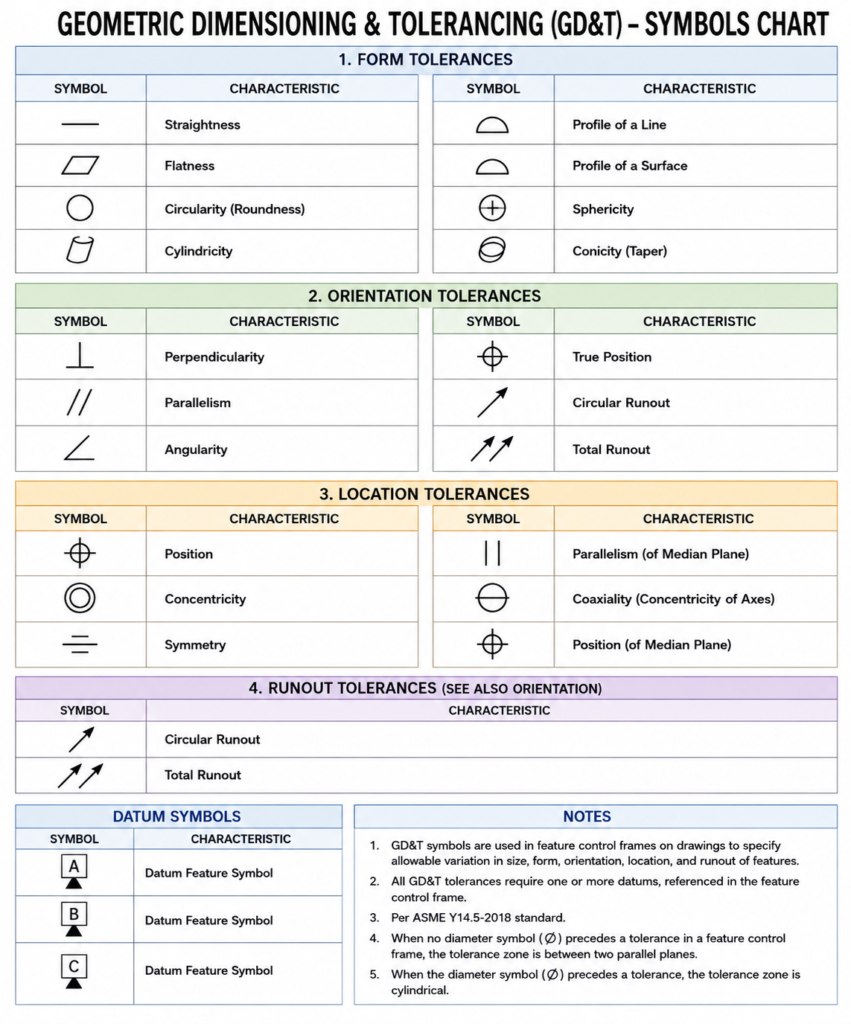
GD&T Symbols chart- Free download | GD&T
Geometric Dimensioning and Tolerancing (GD&T) is a standardized system used in engineering drawings to define…
Categories:




















