
Overview:
SOLIDWORKS Package Overview
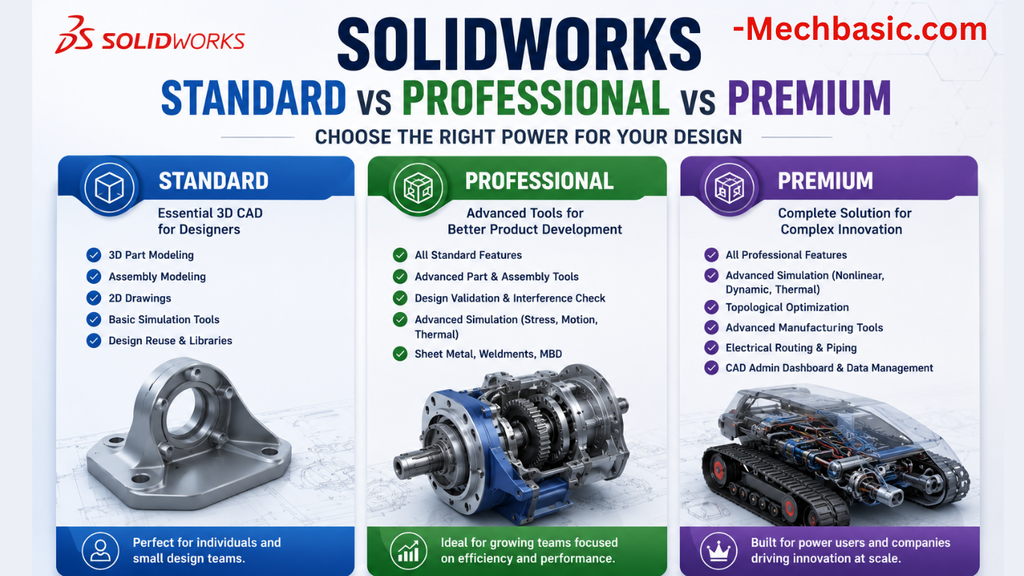
SOLIDWORKS comes in three main Design packages:
- Standard — Core 3D CAD design and modeling
- Professional — Standard + productivity, rendering and cost tools
- Premium — Professional + advanced routing and simulation
All three provide core part, assembly and 2D drawing capabilities.
SOLIDWORKS Standard
Best for: Basic mechanical design
- Part & assembly modeling
- 2D drawings
- Sheet metal & weldments
- Mold design tools
- Design and manufacturability checks
- ECAD-MCAD collaboration
- Basic manufacturing capabilities
- Cloud collaboration and file management
Ideal for: Designers, students and engineers focused mainly on mechanical CAD.
SOLIDWORKS Professional
Everything in Standard + productivity tools
- Intelligent CAD library / Toolbox
- Photorealistic rendering
- Automated tolerance stack-up analysis
- Automatic cost estimation
- CAD standards checking
- Additional productivity and documentation capabilities
Ideal for: Professional designers who need faster workflows, visualization and cost estimation.
SOLIDWORKS Premium
Everything in Professional + advanced engineering tools
- Electrical cable & wiring harness routing
- Pipe & tube routing
- Linear static analysis
- Time-based motion analysis
- Advanced surface flattening
- Advanced simulation capabilities
Ideal for: Engineers working with complex assemblies, routing and engineering analysis.
Standard vs Professional vs Premium
| Feature | Standard | Professional | Premium |
|---|---|---|---|
| Part & Assembly Design | ✓ | ✓ | ✓ |
| 2D Drawings | ✓ | ✓ | ✓ |
| Sheet Metal & Weldments | ✓ | ✓ | ✓ |
| Mold Design | ✓ | ✓ | ✓ |
| CAD Library / Toolbox | — | ✓ | ✓ |
| Photorealistic Rendering | — | ✓ | ✓ |
| Cost Estimation | — | ✓ | ✓ |
| Tolerance Stack-up | — | ✓ | ✓ |
| CAD Standards Checking | — | ✓ | ✓ |
| Electrical Routing | — | — | ✓ |
| Pipe & Tube Routing | — | — | ✓ |
| Linear Static Analysis | — | — | ✓ |
| Motion Analysis | — | — | ✓ |
Which SOLIDWORKS Package Should You Choose?
Choose Standard if:
- You mainly need 3D modeling and drawings
- Your work focuses on mechanical design
Choose Professional if:
- You need rendering and cost estimation
- You want additional productivity tools
- You regularly work with standard components
Choose Premium if:
- You need simulation and motion analysis
- You work with electrical or piping routing
- Your projects require advanced engineering capabilities
Final Comparison
Standard → Design
Professional → Design + Productivity
Premium → Design + Productivity + Advanced Engineering
The best package depends on the features your workflow actually requires, rather than simply choosing the highest tier.
SOLIDWORKS Standard vs Professional vs Premium: Full Feature Comparison
Choosing between SOLIDWORKS Standard, Professional, and Premium can be confusing because all three packages share the same core 3D CAD environment. The major differences appear when you need advanced productivity tools, costing, rendering, tolerance analysis, routing, motion analysis, or structural analysis.
For the 2026 release, SOLIDWORKS continues to position the three packages as progressively more capable tiers: Standard → Professional → Premium. SOLIDWORKS also has an Ultimate package, but this comparison focuses on the three commonly selected Design packages.
SOLIDWORKS Package Overview
At a high level:
| Feature | Standard | Professional | Premium |
|---|---|---|---|
| 3D Part Modeling | ✅ | ✅ | ✅ |
| Assembly Modeling | ✅ | ✅ | ✅ |
| 2D Drawings | ✅ | ✅ | ✅ |
| Sheet Metal | ✅ | ✅ | ✅ |
| Weldments | ✅ | ✅ | ✅ |
| Mold Tools | ✅ | ✅ | ✅ |
| Design/Manufacturability Checks | ✅ | ✅ | ✅ |
| ECAD/MCAD Collaboration | ✅ | ✅ | ✅ |
| Intelligent CAD Library | ❌ | ✅ | ✅ |
| Manufacturing Cost Analysis | ❌ | ✅ | ✅ |
| CAD Standards Checking | ❌ | ✅ | ✅ |
| Tolerance Stack-Up | ❌ | ✅ | ✅ |
| Photorealistic Rendering | ❌ | ✅ | ✅ |
| Electrical Harness Routing | ❌ | ❌ | ✅ |
| Pipe & Tube Routing | ❌ | ❌ | ✅ |
| Linear Static Analysis | Limited | Limited | ✅ |
| Time-Based Motion Analysis | ❌ | ❌ | ✅ |
| Advanced Surface Flattening | ❌ | ❌ | ✅ |
The current official SOLIDWORKS comparison identifies Professional as adding capabilities such as intelligent CAD libraries, manufacturing cost analysis and CAD standards checking, while Premium adds routing, linear static analysis, motion analysis and advanced surface flattening.
SOLIDWORKS Standard
What is SOLIDWORKS Standard?
SOLIDWORKS Standard is the entry-level full SOLIDWORKS Design package.
It is not a stripped-down CAD application. It contains the fundamental tools most mechanical designers need for creating:
- Parts
- Assemblies
- 2D manufacturing drawings
- Sheet-metal components
- Weldments
- Mold designs
- Production documentation
SOLIDWORKS describes Standard as providing industry-standard part, assembly and drawing capabilities together with specialized design tools and design/manufacturability checks.
Core modeling
Standard includes the fundamental parametric modeling workflow:
Sketch → Feature → Part → Assembly → Drawing
You can create:
- Extrusions
- Revolves
- Sweeps
- Lofts
- Fillets
- Chamfers
- Patterns
- Shells
- Ribs
- Holes
- Reference geometry
- Configurations
- Multi-body parts
For normal mechanical component design, Standard provides the same core modeling foundation as the higher packages.
Assemblies
Standard supports assembly design and allows you to:
- Insert components
- Apply mates
- Create subassemblies
- Detect interference
- Create exploded views
- Generate bills of materials
- Create assembly drawings
- Work with large mechanical assemblies
This is important because you don’t need Professional or Premium simply to perform ordinary 3D mechanical assembly design.
2D Drawings
Standard also includes comprehensive drawing functionality.
You can create:
- Orthographic views
- Section views
- Detail views
- Auxiliary views
- Isometric views
- Exploded views
- Dimensions
- GD&T annotations
- Surface-finish symbols
- Weld symbols
- Hole callouts
- Bill of Materials
- Revision tables
- Weldment cut lists
SOLIDWORKS 2026 documentation confirms that drawings are generated directly from parts and assemblies and support standards such as ANSI, ISO, DIN, GOST, JIS, BSI and GB.
Sheet Metal, Weldments and Mold Tools
Standard includes specialized design tools for:
Sheet metal
Useful for:
- Brackets
- Enclosures
- Cabinets
- Panels
- Covers
- Frames
Weldments
Useful for:
- Structural frames
- Machine bases
- Support structures
- Fabricated frames
Mold design
Useful for:
- Mold cores
- Cavities
- Parting lines
- Mold-related geometry
These specialized design capabilities are included across Standard, Professional and Premium.
Simulation in Standard
This is an area where buyers sometimes misunderstand the package differences.
Standard provides some basic analysis capability, but it is not equivalent to purchasing the full SOLIDWORKS Simulation product.
SOLIDWORKS describes SimulationXpress as a limited introductory analysis tool available with SOLIDWORKS Design Standard and Professional. It is limited to single-body parts and basic linear analysis.
Therefore:
Standard is excellent for CAD modeling but shouldn’t be selected solely because you expect to perform extensive FEA.
SOLIDWORKS Professional
What is SOLIDWORKS Professional?
SOLIDWORKS Professional includes everything in Standard and adds tools intended to make professional engineering and design workflows faster.
The biggest additions are:
- Intelligent CAD libraries
- Manufacturing cost analysis
- CAD standards checking
- Tolerance analysis
- Photorealistic rendering
- Additional productivity tools
- eDrawings Professional capabilities
SOLIDWORKS’ own package comparison positions Professional as the productivity-focused step above Standard.
SOLIDWORKS Toolbox
One of the most useful Professional features is the SOLIDWORKS Toolbox / intelligent CAD library.
Instead of modeling every standard fastener yourself, you can access large libraries of commonly used components.
Examples include:
- Bolts
- Screws
- Nuts
- Washers
- Bearings
- Pins
- Connectors
- Other standard hardware
The current SOLIDWORKS product matrix describes the intelligent CAD library as containing hundreds of thousands of prebuilt industry-standard fasteners.
Why this matters
Imagine designing a machine containing 150 bolts.
With Standard, you can still create the assembly—but Professional can dramatically reduce the repetitive work involved in sourcing and configuring standard hardware.
For companies doing machine design every day, this can justify the Professional upgrade by itself.
Manufacturing Cost Analysis
Professional also adds manufacturing cost analysis.
This helps designers estimate manufacturing costs directly within the design workflow.
It can be useful for:
- Machined components
- Sheet-metal parts
- Manufacturing quotations
- Design comparisons
- Early-stage cost decisions
Instead of waiting until the design reaches purchasing or manufacturing, engineers can use cost information while the product is still being designed.
That makes Professional particularly useful for design-to-cost engineering.
CAD Standards Checking
Professional adds tools for checking whether designs and drawings comply with predefined company standards.
For example, an engineering organization might establish rules regarding:
- Layer standards
- Dimension styles
- Drawing annotations
- Drafting practices
- Document properties
SOLIDWORKS describes CAD Standards Checking as a way to establish design standards and check drawings/models against them.
This becomes increasingly useful as the engineering team grows.
Tolerance Stack-Up Analysis
Professional also provides automated tolerance stack-up functionality.
This is particularly important for:
- Precision machinery
- Automotive components
- Mechanical assemblies
- Mass production
- Interchangeable parts
For a one-person design shop, this may not justify upgrading.
For a company manufacturing thousands of units, it can be extremely valuable.
Photorealistic Rendering
Professional adds photorealistic rendering capabilities.
This can be useful for:
- Product presentations
- Marketing images
- Customer approvals
- Product brochures
- Design reviews
- Sales presentations
You can take a mechanical CAD model and produce a much more realistic representation of the finished product.
eDrawings Professional
Professional also provides enhanced eDrawings Professional functionality.
This is particularly useful when sharing designs with customers or suppliers who don’t have a full SOLIDWORKS installation.
SOLIDWORKS highlights eDrawings Professional as one of the differentiating capabilities of the Professional package.
SOLIDWORKS Premium
What is SOLIDWORKS Premium?
SOLIDWORKS Premium includes the capabilities of Standard and Professional and adds advanced engineering functions.
The most important additions are:
- Electrical harness routing
- Pipe routing
- Tube routing
- Duct-related design capabilities
- Time-based motion analysis
- Linear static analysis for parts and assemblies
- Advanced surface flattening
SOLIDWORKS specifically describes Premium as expanding the design package into specialty areas such as wire/tube routing, kinematics and linear static stress analysis.
Electrical Harness Routing
Premium becomes important when your mechanical product contains substantial electrical wiring.
Examples:
- Automotive systems
- Industrial machines
- Robotics
- Control panels
- Electrical cabinets
- Automated equipment
Instead of treating cables as manually modeled geometry, routing tools help manage:
- Wires
- Cables
- Connectors
- Harnesses
- Routing paths
This is a major difference from Standard and Professional.
Pipe and Tube Routing
Premium also supports pipe and tube routing.
This is particularly useful for:
- Hydraulic systems
- Pneumatic systems
- Process equipment
- Industrial machinery
- Cooling systems
- Fluid-handling equipment
If your machine contains dozens or hundreds of pipes and tubes, manually creating this geometry can become extremely time-consuming.
Premium’s routing functionality can therefore have a substantial productivity advantage.
Motion Analysis
Premium adds time-based motion analysis.
This lets engineers investigate how mechanisms behave as they move.
For example:
- Linkages
- Mechanisms
- Hinges
- Cam systems
- Robotic mechanisms
- Moving assemblies
You can investigate movement over time rather than simply checking whether components geometrically interfere.
SOLIDWORKS identifies time-based motion analysis as one of the Premium-level capabilities.
Linear Static Analysis
Premium also provides linear static analysis for parts and assemblies.
This can help answer questions such as:
- Will this bracket deform excessively?
- Where is the highest stress?
- What happens under a specified load?
- Is the factor of safety acceptable?
- Does the assembly need reinforcement?
This is a substantial step beyond the basic analysis capabilities available in lower tiers.
However, it is important not to confuse this with the complete SOLIDWORKS Simulation Premium product.
SOLIDWORKS states that the full Simulation product is separately tiered, while SOLIDWORKS Design Premium includes time-based motion analysis and linear static analysis for parts and assemblies.
Advanced Surface Flattening
Premium also adds advanced surface-flattening functionality.
This can be useful when designing:
- Complex sheet components
- Fabricated products
- Flexible materials
- Advanced formed surfaces
If your work involves complicated geometry that must eventually become a flat manufactured shape, Premium can provide useful tools beyond ordinary sheet-metal workflows.
Standard vs Professional vs Premium
Here’s the most practical way to compare the packages.
Standard
Best for:
- Part design
- Assembly design
- Drawing creation
- Sheet metal
- Weldments
- Mold design
- General machine design
Professional
Best for:
- Professional machine designers
- Engineering departments
- Product designers
- Companies with standard hardware libraries
- Cost-conscious design
- Drawing standards
- Tolerance analysis
- Product visualization
Premium
Best for:
- Complex machinery
- Automation
- Robotics
- Hydraulic/pneumatic equipment
- Electrical/mechanical products
- Mechanism design
- Structural analysis
- Pipe/tube routing
Feature-by-Feature Comparison
| Capability | Standard | Professional | Premium |
|---|---|---|---|
| Part modeling | ✅ | ✅ | ✅ |
| Assembly modeling | ✅ | ✅ | ✅ |
| 2D drawings | ✅ | ✅ | ✅ |
| Sheet metal | ✅ | ✅ | ✅ |
| Weldments | ✅ | ✅ | ✅ |
| Mold tools | ✅ | ✅ | ✅ |
| Design checks | ✅ | ✅ | ✅ |
| ECAD/MCAD collaboration | ✅ | ✅ | ✅ |
| Standard fastener library | ❌ | ✅ | ✅ |
| Cost analysis | ❌ | ✅ | ✅ |
| CAD standards checking | ❌ | ✅ | ✅ |
| Tolerance stack-up | ❌ | ✅ | ✅ |
| Photorealistic rendering | ❌ | ✅ | ✅ |
| Electrical harness routing | ❌ | ❌ | ✅ |
| Pipe routing | ❌ | ❌ | ✅ |
| Tube routing | ❌ | ❌ | ✅ |
| Linear static analysis | Limited | Limited | ✅ |
| Time-based motion | ❌ | ❌ | ✅ |
| Advanced surface flattening | ❌ | ❌ | ✅ |
This hierarchy reflects the current SOLIDWORKS package comparison and product matrix.
Which SOLIDWORKS Package Should You Choose?
Choose Standard if you’re a:
- Mechanical CAD student
- Freelancer
- Small fabrication company
- Basic machine designer
- General mechanical designer
- Product designer who doesn’t need advanced analysis
Example
You design brackets, shafts, housings, frames, sheet-metal parts and machine assemblies.
Standard is probably enough.
Choose Professional if you’re a:
- Machine design engineer
- Product development engineer
- Manufacturing engineer
- Engineering consultant
- Small-to-medium engineering company
Example
You design machines containing hundreds of standard fasteners, need manufacturing cost estimates and frequently prepare professional customer presentations.
Professional is likely the better choice.
Choose Premium if you’re a:
- Automation engineer
- Robotics designer
- Hydraulic/pneumatic engineer
- Mechanical systems engineer
- Advanced product-development engineer
- Industrial equipment designer
Example
You design an automated machine containing:
- Mechanical assemblies
- Electrical harnesses
- Pneumatic tubing
- Moving mechanisms
- Structural components
Premium is the logical choice.
Frequently Asked Questions
1. Is SOLIDWORKS Standard enough for mechanical design?
Yes.
Standard contains the core part, assembly and drawing functionality required for conventional mechanical design. It also includes specialized tools such as sheet metal, weldments and mold-related functionality.
2. Is SOLIDWORKS Professional worth it?
It can be, particularly if you use:
- Toolbox/intelligent CAD libraries
- Cost analysis
- Rendering
- Tolerance stack-up
- CAD standards checking
For professional engineering teams, these tools can save substantial time.
3. Is Premium better than Professional?
Technically, yes—it includes Professional functionality plus additional advanced capabilities.
But “better” doesn’t necessarily mean “better value.”
If you never use routing, motion or linear static analysis, Professional may be the more economical choice.
4. Does Premium include everything in Professional?
Yes. Premium builds on the capabilities of Professional and adds the higher-level design and engineering functionality.
5. Does Standard have sheet metal?
Yes. Specialized design tools for sheet metal are included in Standard, Professional and Premium.
6. Does Standard have weldments?
Yes. Weldment design is included across the three packages.
7. Does Professional include rendering?
Yes. Professional adds photorealistic rendering capabilities compared with Standard.
8. Does Professional include Toolbox?
Yes. The Professional package includes the intelligent CAD library/Toolbox functionality.
9. Does Premium include routing?
Yes. Premium adds electrical harness, pipe and tube routing capabilities.
10. Does Premium include FEA?
It includes linear static analysis for parts and assemblies, but it is important to distinguish that from the separately licensed full SOLIDWORKS Simulation packages.
11. Does Premium include motion analysis?
Yes. Premium includes time-based motion analysis.
12. Does SOLIDWORKS Professional include PDM?
SOLIDWORKS PDM Standard is included with SOLIDWORKS Design Professional and Premium, according to the 2026 documentation. PDM Professional is separately licensed.
Final Comparison
If you want the simplest answer:
| Your requirement | Recommended package |
|---|---|
| Basic 3D mechanical CAD | Standard |
| Parts + assemblies + drawings | Standard |
| Sheet metal and weldments | Standard |
| Machine design | Standard / Professional |
| Standard hardware library | Professional |
| Cost estimation | Professional |
| Rendering | Professional |
| Tolerance stack-up | Professional |
| CAD standards checking | Professional |
| Electrical harness routing | Premium |
| Pipe/tube routing | Premium |
| Motion analysis | Premium |
| Linear static analysis of assemblies | Premium |
| Advanced mechanical systems | Premium |
The practical recommendation
SOLIDWORKS Standard → Best for straightforward mechanical CAD.
SOLIDWORKS Professional → Best overall balance for many professional engineering users.
SOLIDWORKS Premium → Best when routing, motion analysis or assembly-level structural analysis is part of your regular workflow.
For a company buying several seats, it’s also possible that the optimal solution is not the same package for every employee—for example, Professional for most designers and Premium for engineers who handle routing or advanced analysis.
SOLIDWORKS package capability level
A qualitative comparison of how much additional functionality each package adds beyond core mechanical CAD.
| package | capability |
|---|---|
| Standard | 1 |
| Professional | 2 |
| Premium | 3 |
Useful Links:
How to buy Solidworks Licencing?
Latest articles:
Best Budget Workstation Laptops for SolidWorks and Heavy 3D Assembly Modeling
Best Budget Workstation Laptops for SolidWorks and Heavy 3D Assembly Modeling Overview What Does SOLIDWORKS…
SolidWorks Standard vs Professional vs Premium: Full Feature Comparison
SolidWorks Standard vs Professional vs Premium: Full Feature Comparison Overview: SOLIDWORKS Package Overview SOLIDWORKS comes…
SolidWorks 2026 License Cost: Perpetual vs Subscription Pricing Breakdown
SolidWorks 2026 License Cost: Perpetual vs Subscription Pricing Breakdown Overview: SOLIDWORKS 2026 License Options SOLIDWORKS…

Flatness-GD&T | GD&T Tutorials

ANSI vs ISO Standards-Key Differences you need to know

Straightness-GD&T | GD&T Tutorials
Related Tags:
Categories:




















