
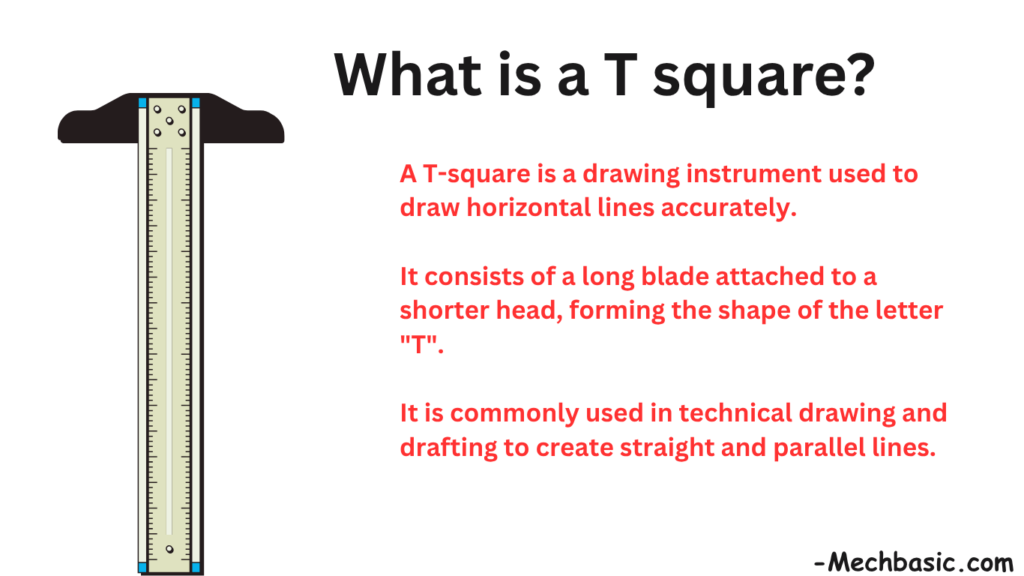
A T-square is a drafting tool used to draw horizontal lines and guide other drawing instruments.
It consists of a long straight blade attached to a perpendicular head, forming a “T” shape.
T-squares are commonly used in engineering drawing and technical drafting.
In this article:
- T-Square (Drawing Instrument)
- Principle of Operation
- Types of T-Squares
- Functions of a T-Square
- How to Use a T-Square
- Using a T-Square with Set Squares
- Applications in Engineering Drawing
- Advantages of a T-Square
- Limitations
- Materials Used
- Care and Maintenance
- T-Square vs Set Square
- T-Square vs Scale
- T-Square vs Parallel Bar
- Importance Before CAD
- Advantages in Engineering Education
- Conclusion
T-Square (Drawing Instrument)
What is a T-Square?
A T-square is a drafting instrument used to draw horizontal lines, guide vertical and inclined lines with set squares, and provide a reference edge for technical drawings.
It gets its name from its shape, which resembles the letter “T”.
Before CAD software became common, the T-square was one of the most important tools used in engineering drawing, architecture, and drafting.
Structure of a T-Square
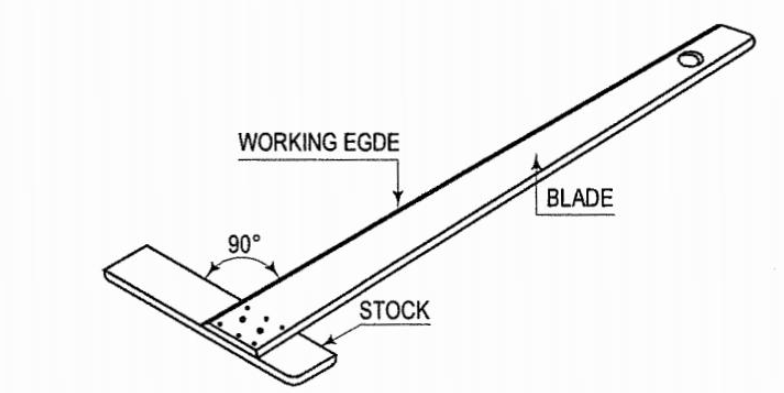
A T-square consists of two main parts:
1. Blade
- Long straight section.
- Used as the drawing edge.
- Slides across the drawing board.
Features
- Straight and smooth
- May be made of wood, plastic, or aluminum
- Often contains measurement markings
2. Head (Stock)
- Short section attached at a right angle to the blade.
- Rests against the edge of the drawing board.
Function
- Maintains a constant 90° relationship.
- Ensures horizontal lines are truly horizontal.
Principle of Operation
The head of the T-square is placed against the edge of the drawing board.
As the instrument slides up and down:
- The blade remains parallel to the bottom edge.
- Accurate horizontal lines can be drawn.
Types of T-Squares
1. Fixed Head T-Square
Features
- Head permanently fixed at 90°.
- Most common type.
Advantages
- Strong
- Accurate
- Easy to use
2. Adjustable Head T-Square
Features
- Head angle can be adjusted.
Applications
- Special drafting requirements
- Angular layouts
3. Wooden T-Square
Features
- Traditional drafting instrument.
- Usually made from hardwood.
Advantages
- Durable
- Stable
4. Plastic T-Square
Features
- Lightweight
- Transparent
Advantages
- Easy to handle
- Low cost
5. Metal T-Square
Features
- Aluminum or steel construction.
Advantages
- High accuracy
- Long life
Functions of a T-Square
1. Drawing Horizontal Lines
This is the primary function.
Example
Drawing:
- Reference lines
- Borders
- Construction lines
2. Guiding Set Squares
A set square is placed against the blade.
This allows drawing:
- Vertical lines
- Inclined lines
3. Drawing Parallel Lines
The T-square can be moved up or down while remaining parallel.
Result
Multiple parallel lines can be drawn accurately.
4. Aligning Drawings
Helps position and align drawing elements.
5. Checking Straightness
Can be used as a straightedge.
How to Use a T-Square
Step 1
Place the head firmly against the left edge of the drawing board.
Step 2
Slide the T-square to the desired position.
Step 3
Hold it securely.
Step 4
Draw along the blade edge.
Step 5
Move to another location if additional lines are needed.
Using a T-Square with Set Squares
This combination is extremely common in engineering drawing.
Procedure
- Position the T-square.
- Place a set square against the blade.
- Draw vertical or angled lines.
Common Angles
45° Set Square
Used for:
- 45°
- 90°
angles
30°–60° Set Square
Used for:
- 30°
- 60°
- 90°
angles
Applications in Engineering Drawing
Mechanical Engineering
Used for:
- Orthographic projections
- Construction lines
- Layout work
Civil Engineering
Used for:
- Site plans
- Structural layouts
Architecture
Used for:
- Floor plans
- Building elevations
- Sections
Advantages of a T-Square
High Accuracy
Produces straight horizontal lines.
Easy to Use
Simple operation.
Fast Drafting
Allows quick creation of parallel lines.
Supports Other Instruments
Works with:
- Set squares
- Protractors
- Scales
Limitations
Requires a Drawing Board
Cannot be used effectively without one.
Limited Angle Creation
Primarily designed for horizontal lines.
Large Size
Can be cumbersome to transport.
Materials Used
Wood
Traditional and durable.
Plastic
Lightweight and transparent.
Aluminum
Strong and precise.
Care and Maintenance
Keep Edges Straight
Avoid bending or warping.
Store Flat
Prevents distortion.
Keep Clean
Dust can affect accuracy.
Avoid Dropping
May damage alignment.
T-Square vs Set Square
| Feature | T-Square | Set Square |
|---|---|---|
| Main Purpose | Horizontal lines | Vertical and inclined lines |
| Shape | T-shaped | Triangular |
| Used Alone | Yes | Usually with T-square |
| Draw Angles | Limited | Yes |
T-Square vs Scale
| Feature | T-Square | Scale |
|---|---|---|
| Draw Straight Lines | Yes | No |
| Measure Length | Limited | Yes |
| Drafting Aid | Yes | No |
T-Square vs Parallel Bar
| Feature | T-Square | Parallel Bar |
|---|---|---|
| Movement | Slides manually | Moves on cables |
| Accuracy | Good | Very high |
| Modern Usage | Less common | More common in professional boards |
Importance Before CAD
Before software such as AutoCAD became widespread, engineers and architects relied heavily on:
- T-squares
- Set squares
- Compasses
- Protractors
- Scales
to create technical drawings.
Although digital drafting has replaced much manual drawing, understanding the T-square remains important in engineering graphics education.
Advantages in Engineering Education
Learning with a T-square helps students understand:
- Projection principles
- Drawing accuracy
- Geometric construction
- Drafting fundamentals
These concepts remain useful even when using CAD software.
Conclusion
A T-square is a fundamental drafting instrument used primarily for drawing horizontal lines and guiding set squares for vertical and angled lines. It consists of a blade and a head fixed at right angles, allowing accurate and efficient technical drawing. Although modern CAD software has largely replaced manual drafting, the T-square remains an important educational tool for understanding engineering drawing principles, geometric construction, and traditional drafting techniques.
Other courses:





