
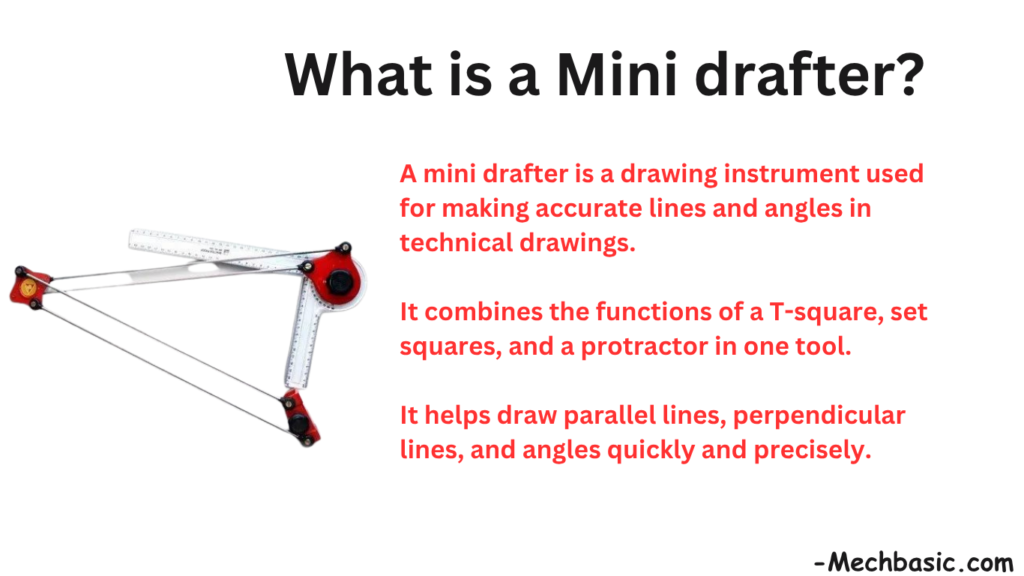
A mini drafter is a drafting instrument used for drawing accurate horizontal, vertical, and inclined lines.
It combines the functions of a T-square, protractor, and set squares in one tool.
Mini drafters improve speed, accuracy, and convenience in engineering drawing.
In this article:
- Mini Drafter
- Main Parts of a Mini Drafter
- Principle of Operation
- Functions of a Mini Drafter
- How to Use a Mini Drafter
- Common Angles Used
- Advantages of a Mini Drafter
- Applications
- Mini Drafter vs T-Square
- Mini Drafter vs Drafting Machine
- Care and Maintenance
- Limitations
- Importance in Engineering Education
- Conclusion
Mini Drafter
What is a Mini Drafter?
A Mini Drafter is a precision drafting instrument used in engineering drawing to draw horizontal, vertical, parallel, perpendicular, and inclined lines accurately on a drawing board.
It combines the functions of several traditional drawing instruments, such as:
- T-square
- Set squares
- Protractor
- Parallel ruler
Because of its versatility and accuracy, the mini drafter largely replaced the traditional T-square and set-square combination in many engineering drawing classrooms and drafting offices.
Mini Drafter Overview
A mini drafter is mounted on a drawing board and consists of a movable head with scales that can rotate to different angles.
It allows the user to draw lines at precise angles without repeatedly adjusting separate instruments.
Main Parts of a Mini Drafter
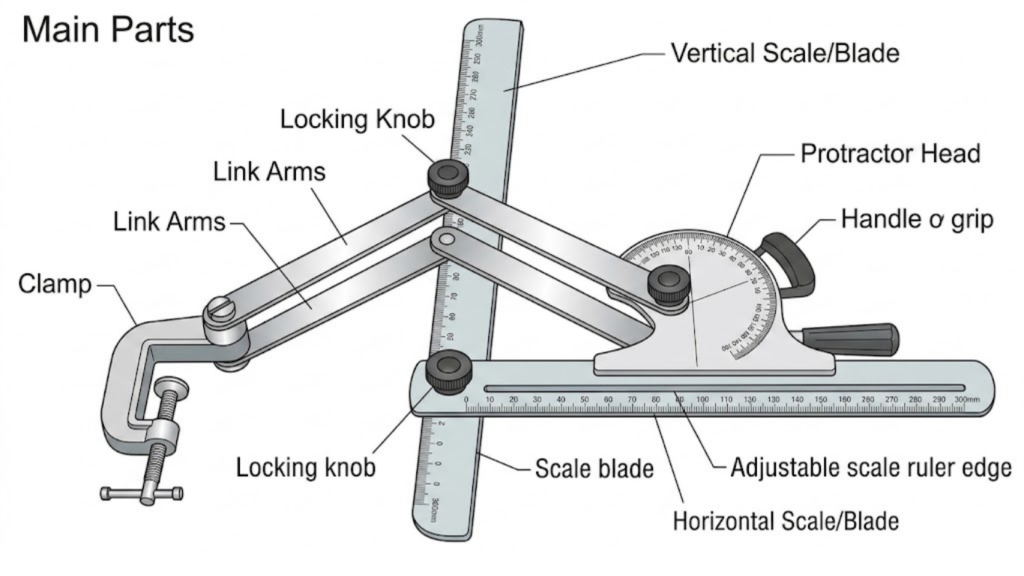
1. Drawing Head
The central component.
Functions
- Holds the scales
- Rotates to desired angles
- Maintains accuracy
2. Protractor Head
Located at the center of the drawing head.
Functions
- Measures angles
- Rotates through 360°
- Locks at desired positions
Typical Graduations
- 0° to 360°
- 0° to 180°
3. Horizontal Scale
Used for:
- Drawing horizontal lines
- Measuring distances
4. Vertical Scale
Used for:
- Drawing vertical lines
- Checking alignment
5. Clamping Mechanism
Locks the head at a desired angle.
Purpose
Prevents accidental movement.
6. Guide Arms
Connect the drafting head to the drawing board.
Function
Allow smooth movement across the drawing surface.
7. Sliding Mechanism
Allows movement:
- Up and down
- Left and right
while maintaining parallelism.
Principle of Operation
The mini drafter works on the principle of:
Parallel Motion
The drafting head moves across the drawing board while maintaining its orientation.
This allows:
- Parallel lines
- Perpendicular lines
- Accurate angular layouts
Functions of a Mini Drafter
1. Drawing Horizontal Lines
The most common operation.
Applications
- Borders
- Reference lines
- Engineering projections
2. Drawing Vertical Lines
No separate set square is required.
Benefits
- Faster drafting
- Improved accuracy
3. Drawing Parallel Lines
Move the drafting head without changing orientation.
Result
Perfectly parallel lines.
4. Drawing Perpendicular Lines
The built-in scales maintain 90° alignment.
5. Drawing Inclined Lines
The protractor head can be rotated to:
- 15°
- 30°
- 45°
- 60°
- 75°
- Any desired angle
6. Measuring Angles
Acts as a built-in protractor.
7. Measuring Lengths
The scales can be used for direct measurement.
How to Use a Mini Drafter
Step 1
Fix the mini drafter to the drawing board.
Step 2
Check alignment and calibration.
Step 3
Move the drafting head to the desired location.
Step 4
Set the required angle if needed.
Step 5
Lock the head.
Step 6
Draw along the edge of the scale.
Common Angles Used
| Angle | Application |
|---|---|
| 0° | Horizontal lines |
| 30° | Isometric drawing |
| 45° | Chamfers and projections |
| 60° | Isometric construction |
| 90° | Vertical lines |
Advantages of a Mini Drafter
High Accuracy
Provides precise line orientation.
Faster Drafting
Reduces the need for multiple instruments.
Multi-Function Tool
Replaces:
- T-square
- Set squares
- Protractor
Better Productivity
Speeds up engineering drawing work.
Easy Angle Setting
Quick angle adjustment using the protractor head.
Applications
Mechanical Engineering
Used for:
- Orthographic projections
- Sectional views
- Machine part drawings
Civil Engineering
Used for:
- Building plans
- Structural layouts
Architecture
Used for:
- Floor plans
- Elevations
- Sections
Technical Education
Commonly used in engineering colleges and drafting courses.
Mini Drafter vs T-Square
| Feature | Mini Drafter | T-Square |
|---|---|---|
| Horizontal Lines | Yes | Yes |
| Vertical Lines | Yes | Requires set square |
| Angle Measurement | Yes | No |
| Rotatable Head | Yes | No |
| Speed | Faster | Slower |
| Accuracy | Higher | Good |
Mini Drafter vs Drafting Machine
| Feature | Mini Drafter | Drafting Machine |
|---|---|---|
| Size | Smaller | Larger |
| Cost | Lower | Higher |
| Portability | Better | Less portable |
| Applications | Educational and professional | Professional drafting |
Care and Maintenance
Keep Scales Clean
Dust affects visibility and accuracy.
Avoid Excessive Force
Protect the guide arms and locking mechanisms.
Check Calibration
Ensure horizontal and vertical alignment remains accurate.
Store Properly
Prevent damage to scales and protractor head.
Limitations
Requires a Drawing Board
Cannot function independently.
Less Useful in Modern CAD Work
Most professional drafting is now done digitally.
Mechanical Wear
Moving parts can lose accuracy over time if not maintained.
Importance in Engineering Education
Even though CAD software such as AutoCAD is widely used today, mini drafters are still valuable for learning:
- Orthographic projection
- Geometric construction
- Line relationships
- Manual drafting fundamentals
These concepts help students understand the principles behind technical drawings before moving to CAD.
Conclusion
A mini drafter is a versatile drafting instrument that combines the functions of a T-square, set squares, and protractor into a single device. It is used to draw horizontal, vertical, parallel, perpendicular, and inclined lines accurately and efficiently. Because of its precision, ease of use, and ability to speed up drafting work, the mini drafter became one of the most important tools in traditional engineering drawing and remains valuable for teaching drafting fundamentals even in the age of CAD.
Other courses:





