
2D Machining involves tool movement in the X and Y axes only, with a constant depth in Z. It is used for simple operations like profiling, engraving, and cutting flat shapes.
2.5D Machining allows movement in X, Y, and Z, but not simultaneously in all directions. The tool cuts at multiple fixed depths, making it ideal for pockets, slots, holes, and step features.
3D Machining involves continuous, simultaneous movement in X, Y, and Z axes. It is used to create complex curved surfaces and freeform shapes, such as molds, dies, and sculpted components.
In summary, complexity increases from 2D → 2.5D → 3D, along with programming and machining capability.
In this article:
What is 2D, 2.5D, and 3D in CNC Machining?
In CNC machining, 2D, 2.5D, and 3D describe the complexity of tool movement and the type of geometry a machine can produce. These terms are mainly used in CNC milling, but the concept applies broadly to manufacturing and CAD/CAM.
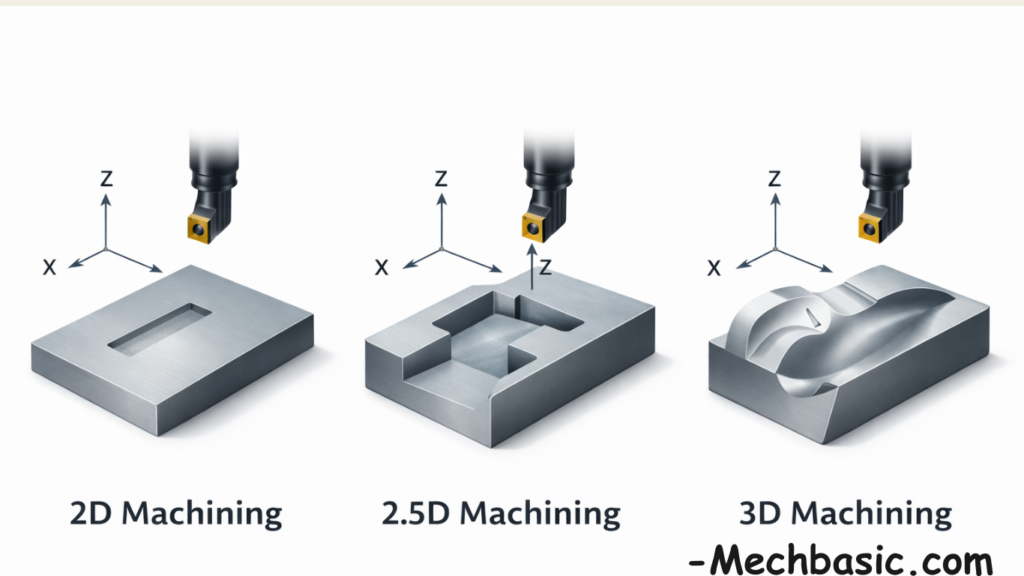
1. 2D Machining
Definition
2D machining involves tool movement in only two axes (X and Y).
The cutting depth (Z-axis) is fixed and does not change during machining.
Axis Movement
- X-axis: ✔ Continuous
- Y-axis: ✔ Continuous
- Z-axis: ✖ Fixed (single depth)
Characteristics
- Produces flat shapes
- No variation in depth
- Geometry is limited to profiles or outlines
Typical Operations
- Profile cutting
- Contour cutting
- Engraving at a single depth
- Laser cutting
- Plasma cutting
- Waterjet cutting
Example
- Cutting a nameplate with letters at the same depth
- Cutting sheet metal profiles
Advantages
✔ Simple programming
✔ Low cost
✔ High speed
✔ Minimal setup
Limitations
❌ No depth variation
❌ Cannot create pockets or steps
2. 2.5D Machining
Definition
2.5D machining allows movement in X and Y axes simultaneously, while the Z-axis moves in steps, not continuously.
The tool cuts one depth at a time, then moves to another depth.
Axis Movement
- X-axis: ✔ Continuous
- Y-axis: ✔ Continuous
- Z-axis: ✔ Step-by-step only
Characteristics
- Multiple depth levels
- Vertical walls
- Flat bottom surfaces
- No smooth curved surfaces
Typical Operations
- Pocket milling
- Slot cutting
- Drilling
- Facing
- Counterboring
- Step milling
Example
- A machine plate with different pocket depths
- Brackets with slots and holes
Advantages
✔ More capability than 2D
✔ Less complex than 3D
✔ Faster machining
✔ Lower cost
Limitations
❌ Cannot machine freeform or sculpted surfaces
❌ Z-axis does not move while cutting X–Y
3. 3D Machining
Definition
3D machining allows simultaneous movement in X, Y, and Z axes, creating complex and smooth surfaces.
Axis Movement
- X-axis: ✔ Continuous
- Y-axis: ✔ Continuous
- Z-axis: ✔ Continuous
Characteristics
- Curved and sloped surfaces
- Freeform geometry
- Variable depth cutting
Typical Operations
- Mold and die machining
- Turbine blade manufacturing
- Sculptured surfaces
- Aerospace components
- Complex cavities
Example
- Injection mold cavities
- Engine components with complex contours
Advantages
✔ Highest flexibility
✔ Complex shapes possible
✔ High surface quality
Limitations
❌ High programming complexity
❌ Longer machining time
❌ Higher cost
Comparison Table
| Feature | 2D | 2.5D | 3D |
|---|---|---|---|
| X–Y movement | Yes | Yes | Yes |
| Z-axis movement | Fixed | Stepwise | Continuous |
| Depth variation | No | Yes (steps) | Yes (smooth) |
| Curved surfaces | No | No | Yes |
| Programming difficulty | Low | Medium | High |
| Cost | Low | Medium | High |
Practical Industry Insight
- 2D machining → sheet metal and simple profiles
- 2.5D machining → 80% of industrial parts
- 3D machining → high-precision and complex parts
Conclusion:
- 2D → flat cutting at one depth
- 2.5D → cutting at multiple flat depths
- 3D → smooth curved and complex shapes
Other courses:





