
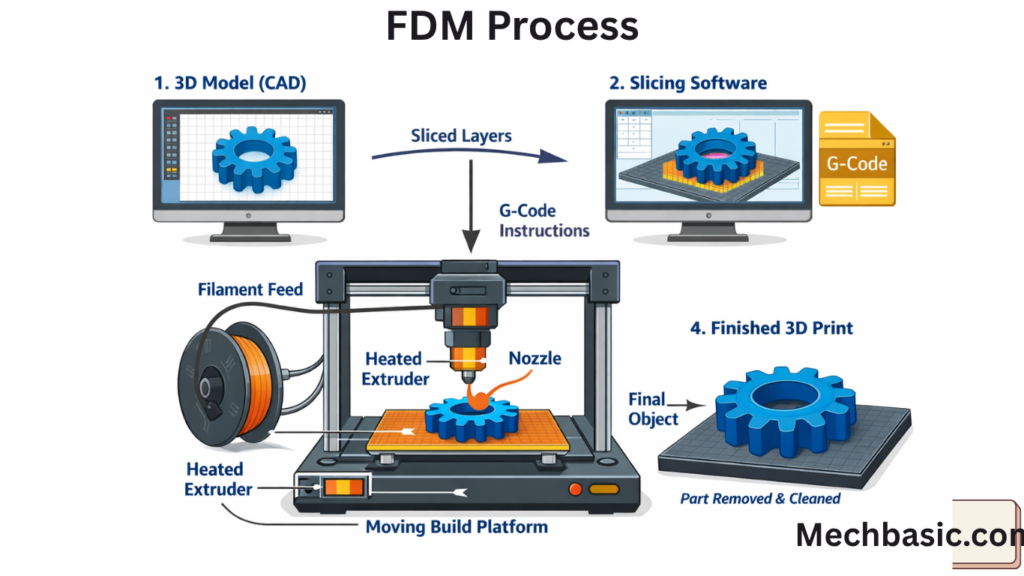
Common software for FDM printing includes CAD tools like Fusion 360, SolidWorks, and Tinkercad for designing parts.
Slicing software such as Cura, PrusaSlicer, and Simplify3D converts models into printer instructions (G-code).
Some printers also use proprietary software for control and monitoring during printing.
In this article:
Software Used for FDM Printing (in Detail)
FDM (Fused Deposition Modeling) uses multiple types of software across the workflow—from designing the model to controlling the printer and checking quality. Each software has a specific role in the CAD → Slice → Print → Inspect pipeline.
1. CAD (Computer-Aided Design) Software
Purpose
Used to create the 3D model before printing.
Popular CAD software
- Fusion 360
- SolidWorks
- CATIA
- AutoCAD
- Siemens NX
Functions
- 3D part design
- Assembly modeling
- Engineering drawings
- Dimension control
Importance
👉 This is the starting point of FDM printing
2. Slicing Software (MOST IMPORTANT FOR FDM)
Purpose
Converts 3D CAD model into layer-by-layer instructions (G-code)
Popular slicers
- Ultimaker Cura (most widely used)
- PrusaSlicer
- Simplify3D
- IdeaMaker
Functions
- Layer generation
- Infill settings (strength control)
- Support structure creation
- Print speed control
- Temperature settings
Importance
👉 Without slicing software, FDM printers cannot work
3. Printer Control Software
Purpose
Controls and monitors the 3D printer during operation
Examples
- OctoPrint
- Repetier-Host
- Pronterface
Functions
- Send G-code to printer
- Start/stop/pause printing
- Temperature monitoring
- Real-time print control
4. Firmware Software (Printer Brain)
Purpose
Controls hardware-level operations of FDM printers
Examples
- Marlin Firmware
- Klipper Firmware
- RepRap Firmware
Functions
- Motor control
- Temperature regulation
- Movement precision
- Safety controls
Importance
👉 Firmware is the operating system of the printer
5. Simulation Software
Purpose
Predicts printing errors before actual printing
Examples
- ANSYS Additive Suite
- Autodesk Netfabb
- Simufact Additive
Functions
- Warping prediction
- Stress analysis
- Thermal deformation simulation
6. Build Preparation Software
Purpose
Prepares models for industrial-grade printing
Examples
- Materialise Magics
- Autodesk Netfabb
- 3DXpert
Functions
- STL repair
- Model orientation optimization
- Multi-part arrangement
7. Monitoring Software
Purpose
Used for real-time print tracking
Examples
- OctoPrint (with plugins)
- AstroPrint
Functions
- Camera monitoring
- Print progress tracking
- Remote control
8. File Formats Used in FDM Software
Common formats
- STL (most common)
- OBJ
- 3MF (advanced format)
- G-code (printer instructions)
Summary Table
| Software Type | Purpose | Examples |
|---|---|---|
| CAD software | 3D design | Fusion 360, SolidWorks |
| Slicer | Convert to layers | Cura, PrusaSlicer |
| Control software | Operate printer | OctoPrint |
| Firmware | Printer control system | Marlin, Klipper |
| Simulation | Error prediction | ANSYS, Netfabb |
| Monitoring | Live tracking | AstroPrint |
Summary:
👉 FDM printing is not just one software—it is a complete digital workflow system:
Design → Slice → Control → Print → Monitor → Improve
Conclusion:
Software used in FDM printing includes CAD software for design, slicing software for generating G-code, printer control software for operation, firmware for hardware control, and simulation software for error prediction. Popular examples include Fusion 360, Cura, OctoPrint, and Marlin firmware.
Other courses:





